
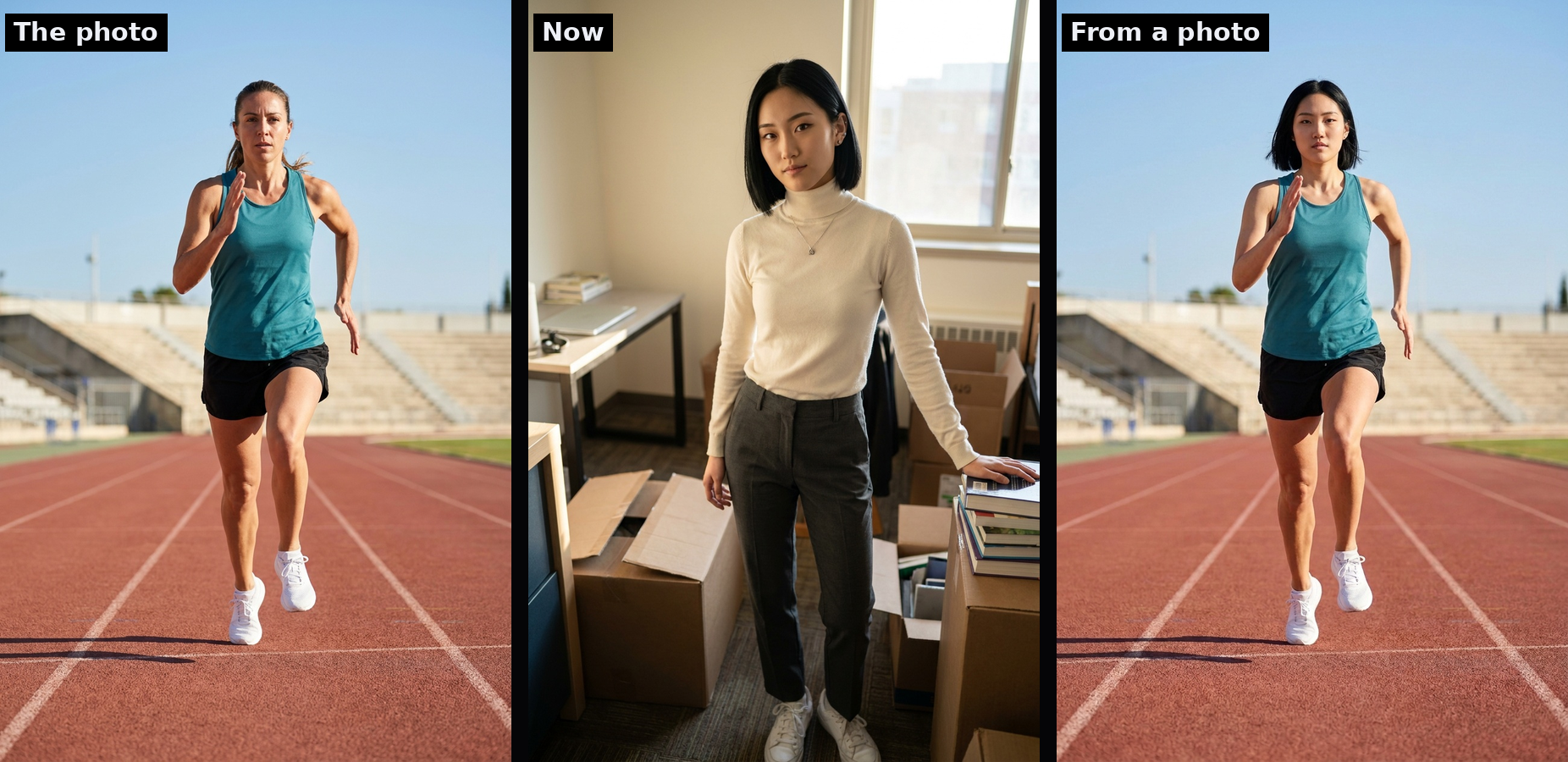
From a Photo: Borrow the Pose and the Outfit
September 25, 2026
The Avatar Studio can now take a photo you like and give your character its pose and its clothes. The person in the photo stays out of it. Your character stays your character.
What it does
Find a photo with a look you want. A runner mid-stride at a finish line. A trench coat on a rainy platform. A fencing jacket, a chef's whites, a tailored suit from a magazine spread. Upload it in the studio, press Place into photo, and you get three portraits of your character standing the way the photo stands, wearing what the photo wears.
The face, hair, skin and build are your character's own. The pose, the framing and the clothes come from the photo. Then the studio puts the result back into your story's setting, so a character who lives in a dorm room is still in that dorm room, just dressed for the finish line.
What it does not do
It never puts the person from the photo into your story. It is not a face swap and there is no way to make it one. If a render comes back with the wrong person in it, the studio marks it as a miss and greys it out so you can see it failed. Misses happen, which is why you get three tries at once.
The story keeps up
Keep a result and it becomes the character's avatar for that playthrough, straight away. The studio also writes down what the character is now wearing, so the next scene, and the one after that, keep the outfit until the story changes it. Later outfit changes work the way they always have.
Picking a good photo
- One person, facing the camera, most of the body in frame.
- Clear and reasonably large. Small, blurry web thumbnails miss more often.
- Clothes you would wear in public. The image model refuses sheer or underwear-style photos and tells you when it has.
- Logos and anything the person is holding are left out on purpose.
Your photo is used for the render and then discarded. It never appears in the gallery and it is not kept.
Where to find it
Open any character's Avatar studio from a story or from the character page. The From a photo bar sits under the usual text box. Upload, add a note if you like ("no jewellery from the photo"), and place your character into the picture.